
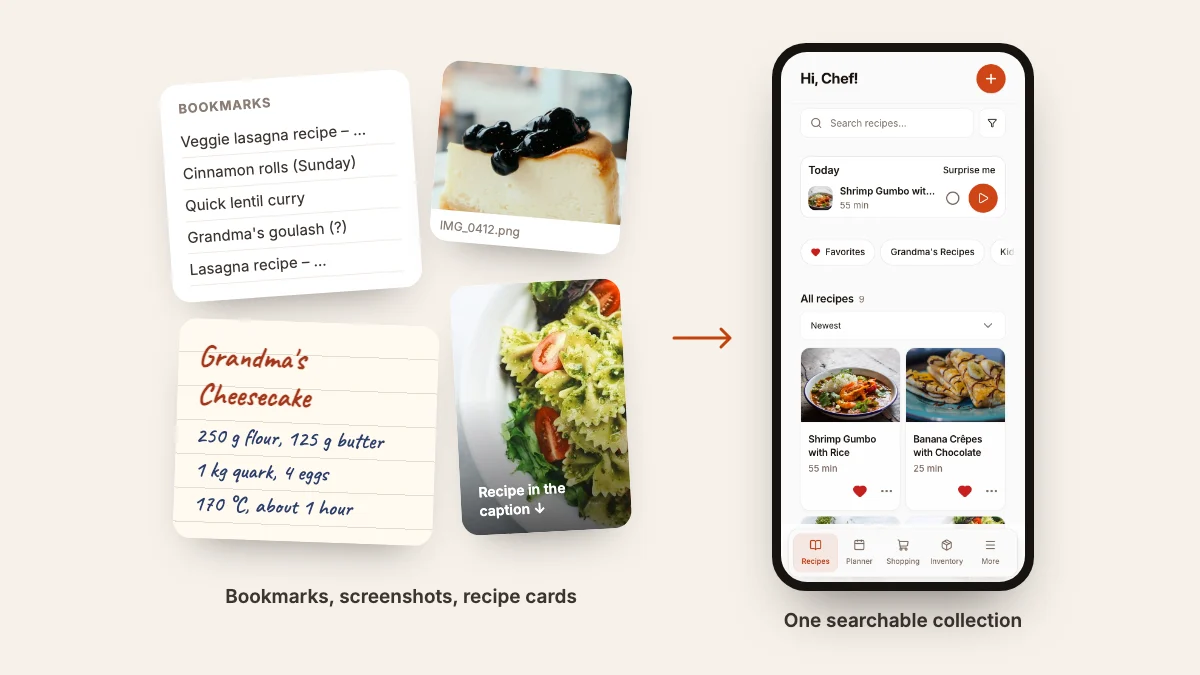
How to tell your recipe collection is not working
Most recipe collections grow on their own: a bookmark here, a screenshot there, a saved reel, a photo of a recipe card from your grandmother. It only becomes a problem on a Tuesday evening when you want to cook something. If one of these sounds familiar, a system pays off:
You cook the same five dishes, even though you have saved dozens, because you cannot find the others.
You look for a recipe in three apps and two browsers before you give up and search the web again.
Your changes to a recipe live on a sticky note or only in your head.
For the weekly shop you copy ingredients from several sources onto one list by hand.
Put everything in one place
The biggest improvement is giving every recipe the same home. Bookmarks, screenshots and photographed pages all go into the same collection, so you stop guessing which app a recipe is in.
Once everything is in one place, tags, cookbooks and search work on your whole library. Start by collecting, and sort afterwards.
Links: most recipe sites publish structured data, so ingredients and steps come through complete.
Photos and screenshots: text recognition turns the camera roll into recipes you can edit.
Cookbook scans and PDFs: import the pages once as photos or screenshots instead of never opening the file again.
Tag recipes by how you will search for them
Label recipes the way you will look for them later. You rarely think 'show me my braises'. You think 'quick vegetarian dinner' or 'something for the kids'.
Three families of tags cover almost any collection. You rarely need more than three tags per recipe, and too many tags mean that after two weeks you stop tagging at all.
Occasion: 'weeknight', 'guests', 'meal prep'
Diet: 'vegetarian', 'high-protein', 'dairy-free'
Effort: 'under 30 min', 'one pot', 'no-cook'
Use cookbooks for what you plan to cook
Tags are filters. Cookbooks are groups you put together yourself: 'Autumn dinners', 'Recipes to try', 'Family favorites'. A cookbook turns a large library into a short list you can pick this week's dinners from.
The most useful one is 'Recipes to try'. Everything you like while scrolling lands there, without crowding the recipes you know work. What you cooked and want to keep moves to a proper cookbook afterwards; the rest you delete.
Search first
Search across ingredients, titles and your own notes is what a digital collection has over a shelf of cookbooks. Three eggs and some spinach to use up? Search for them and cook whatever comes back.
This is also why notes are worth writing. 'Used less salt', 'kids loved it', 'double the sauce' are things you forget by next time. As a note on the recipe, they show up in search.
Keep it tidy with little effort
A system only lasts if the upkeep happens on the side. Three habits are enough:
Tag once, at import, while the recipe is in front of you. 'Sort everything later' does not happen.
Add a note and a rating after cooking. One line is enough, and without ratings any collection turns into a heap of equally important recipes within a year.
Every few weeks, go through 'Recipes to try': move what you have now cooked into a proper cookbook and delete the rest.
From recipe to shopping list
The real payoff of an organized collection comes after the search. A recipe with a structured ingredient list can be scaled to four or six servings, dragged into the meal plan and sent as a shopping list to the app you already use in the store.
That is why it pays to get the ingredients right once, at import: amounts and units apart, sections like 'For the sauce' kept. A recipe that only exists as text in a screenshot can do none of this.
Good to know
Search finds ingredients and notes only in recipes with a structured ingredient list. Upload screenshots through Add recipe instead of keeping them as pictures; text recognition makes them searchable.
The free plan holds 9 recipes. Start with the nine you cook most often; a whole camera roll of recipes needs Premium.
Frequently asked questions
Why can I never find the recipes I saved?
Usually because they are in too many places: bookmarks, screenshots, saved reels, notes apps. Once every recipe sits in one collection with full-text search, you find it by an ingredient or a tag instead of having to remember where you put it.
What is the best way to organize recipes digitally?
Put every recipe in one collection, tag each one by how you will search for it (occasion, diet, effort), group the ones you cook from into cookbooks, and use search across the whole library to find anything.
Should I use tags or folders for recipes?
Both, for different jobs. Tags are filters, and a recipe can carry several (both 'vegetarian' and 'under 30 min'). Cookbooks are groups you put together and cook from, like 'Family favorites'.
How do I find a recipe by the ingredients I have?
Search your collection for the ingredient. You get every saved recipe that uses it, which is what you want when you are cooking from what is already in the fridge. If you keep your pantry up to date, matching recipes are suggested without a search.
What about recipes from Instagram and TikTok?
YouTube and TikTok links are read when the recipe is in the description, and on YouTube also when the description links to it. The video itself is not analyzed. Instagram links are read by the app (iOS and Android) from the caption. In the browser, share Instagram posts with their text or take a screenshot. Text recognition turns it into a recipe with an ingredient list that you tag like any other.